
Meta Portal Kuwait – Registration & Biometric Appointment
Meta Portal is a centralized web platform in Kuwait. The people of Kuwait can access Meta Portal to book online appointment to Kuwaiti Government Offices for availing various government services.
For example: You need to visit the traffic department office for your car related service. Here you can either visit the traffic office randomly to try your luck and get stuck in a long queue or you can book Meta Kuwait Online Appointment with General Department of Traffic to set a fixed time on your desired date.
So, the Meta Portal Kuwait offers great convenience and accuracy of government services as well as saves your valuable time.
Meta Kuwait Online Registration
In order to access the services offered by Meta Kuwait, you have to register and login to the Meta Portal. Being a new user, you should learn Meta Kuwait Online Registration Process and follow it to register yourself.
Meta Portal Registration Requirements:
- Original Civil ID
- An Active Email
- An Active Mobile Number
With all required information, follow the steps given below to register online at Meta Kuwait Portal.
#Step 1: Go to Meta Portal
Open a web browser and go to Meta Kuwait official web portal @meta.e.gov.kw OR Click Here to directly open Meta Portal homepage.
#Step 2: Register as a New User
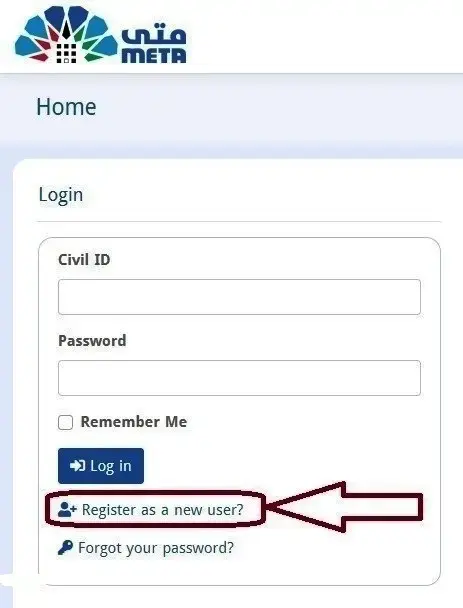
On Metal Portal homepage, you can see the Login section on the left side. Find and click on Register as a New User to go to Meta Kuwait Online Registration Page.
#Step 3: Provide Your Personal Information
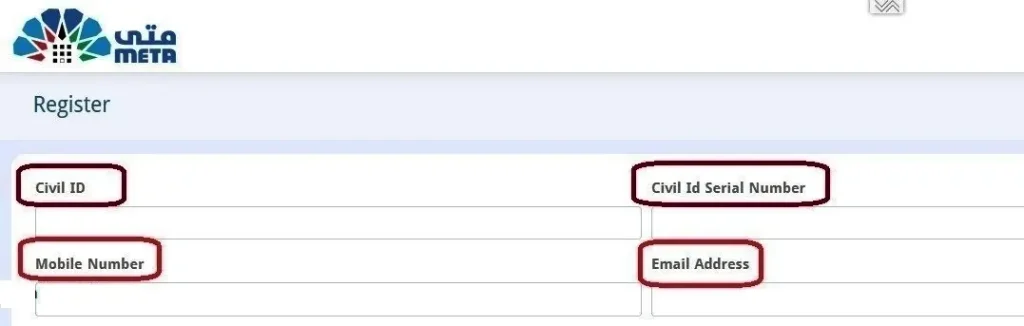
On Meta Portal registration page, you need to provide your personal information. Kindly enter your Civil ID Number, Civil ID Serial Number, an active Email and an active Mobile Number.
Before moving to the next step, make sure that you have entered all personal information correctly.
#Step 4: Accept Terms & Conditions and Register

Click on Terms and Conditions, read them thoroughly and then tick the box to accept all terms & conditions of Meta Portal.
Thereafter click on Register button to proceed.

#Step 5: Activate Your Meta Account
As you click on Register button, soon you will receive an email message from Meta Kuwait. Open that email message and click on the given link to active your Meta Account.
#Step 6: Set Password for Meta Kuwait Login
After account activation, you have to set password for your Meta Account. This password will be helpful for you to sign in to Meta Portal. You must create a strong password that you want to use for logging in to Meta Portal.
Meta Kuwait Login
All registered users are eligible to login to Meta Kuwait Portal. If you have completed Meta Kuwait Online Registration Process, you can login with help of the steps given below.
#Step 1: Go to Meta Portal
You need to go to Meta Kuwait Portal @meta.e.gov.kw OR Click Here.
#Step 2: Enter Your Civil ID and Password
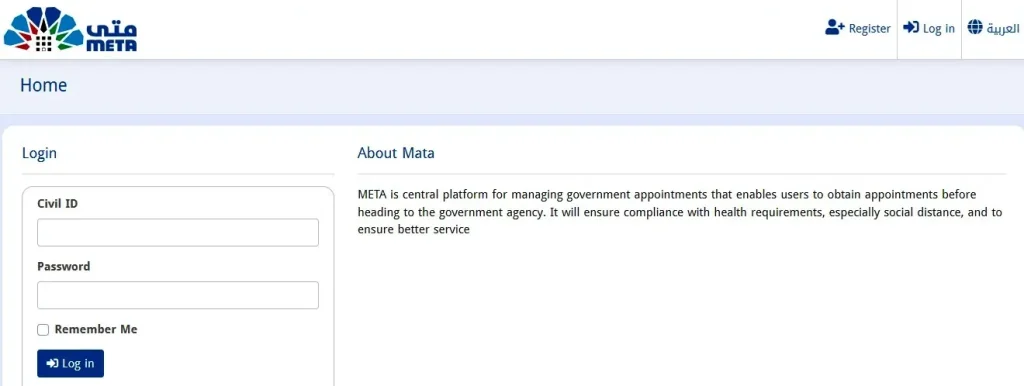
On the left side, you can see the login section. Here you need to enter your Civil ID Number in the first box and your Meta Portal Login Password in the second box.
#Step 3: Login to Meta Portal
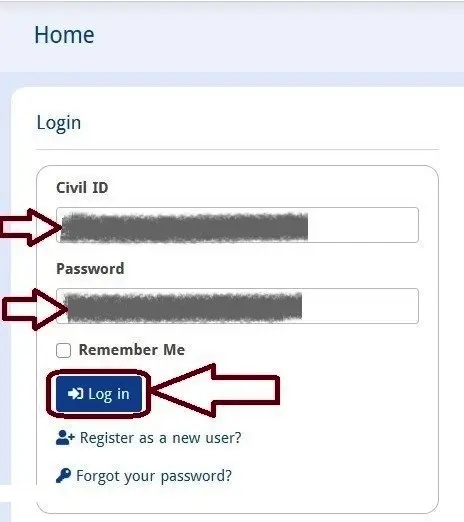
After entering your Civil ID and Password correctly, just click on Login button to login to your Meta Account.
Meta Kuwait Login Error
If you face an error during Meta Kuwait Portal Login Process, check the following instructions to resolve the error.
- Make sure that you entered your Civil ID Number correctly.
- Make sure that you entered your Login Password correctly.
- Make sure that you have a stable internet connection and your web browser version is updated to its latest version.
Meta Kuwait Online Appointment Booking
The online appointment booking is very easy on Meta Kuwait Portal. All registered users can login to Meta Portal for booking online appointments with any government department from the comfort of their home or office.
Here I provide the steps for online appointment booking at Meta Portal as under;
- Go to Meta Kuwait Portal.
- Login with your Civil ID and Password.
- After login, click on Appointments Search given on upper left side.
- Select your desired ministry for your service, e.g. If you want a healthcare service, you can select Ministry of Health.
- Select your applicable government department.
- Read the list of services and click on Apply button for your desired service.
- Choose your appointment date and time slot as per your convenience.
- Verify your details and click on Submit to confirm your appointment.
- Note down your appointment number.
In this way, you can book an online appointment with any government office by using Meta Portal.
Meta Kuwait Online Appointment Modify/Cancel
After booking an online appointment, you need to visit relevant government office on the selected date. In case you are unable go on that day, you can modify or cancel your appointment date & time at Meta Portal.
- Go to Meta Portal and Login.
- Select My Appointments section.
- Click on the appointment that you want to modify or cancel.
- Check the appointment details, click on + on your selected date/time.
- Click on Cancel option and confirm it.
- Select a new date for your Meta Kuwait online appointment. If you don’t want to book another appointment, just avoid this step.
In this way, you can modify or cancel a booked appointment at Meta Kuwait Portal.
Meta Portal Biometric Appointment Kuwait
Biometric Enrollment is an important and mandatory process for every individual living in Kuwait. Before you visit the office of the General Department of Personnel Identification, you must book your biometric appointment online at Meta Portal.
#Step 1: Go to Meta Kuwait Portal
Open a web browser and go to Meta Kuwait official web portal @meta.e.gov.kw OR Click Here.
#Step 2: Login with Your Civil ID and Password
You need to login to Meta Portal for booking a biometric appointment online. Kindly enter your Civil ID Number and Password, the click on Login button to sign in to Meta Portal.
#Step 3: Select Appointments Search
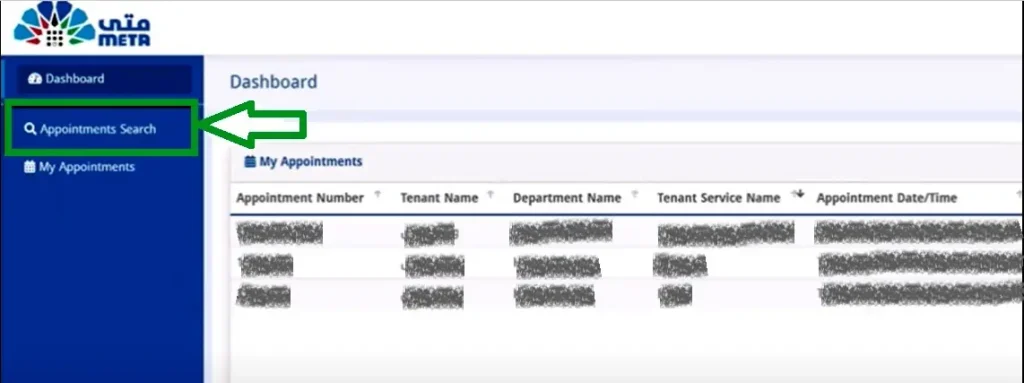
After login, you should select Appointments Search tab on the upper left side of the screen.
#Step 4: Choose Ministry of Interior
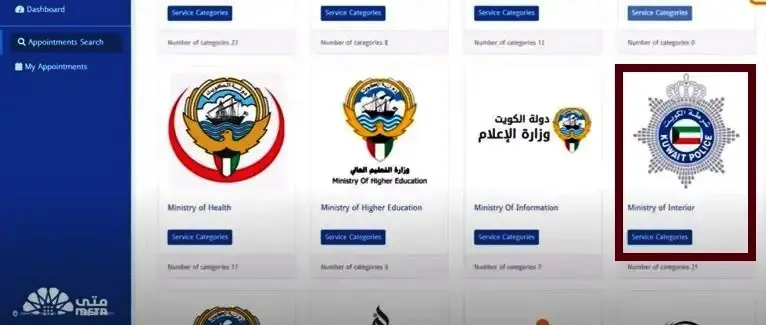
As you select Appointments Search tab, you will see the names of various ministries of Kuwaiti Government. Find out Ministry of Interior and click on Service Categories to continue.
#Step 5: Select General Department of Personnel Identification
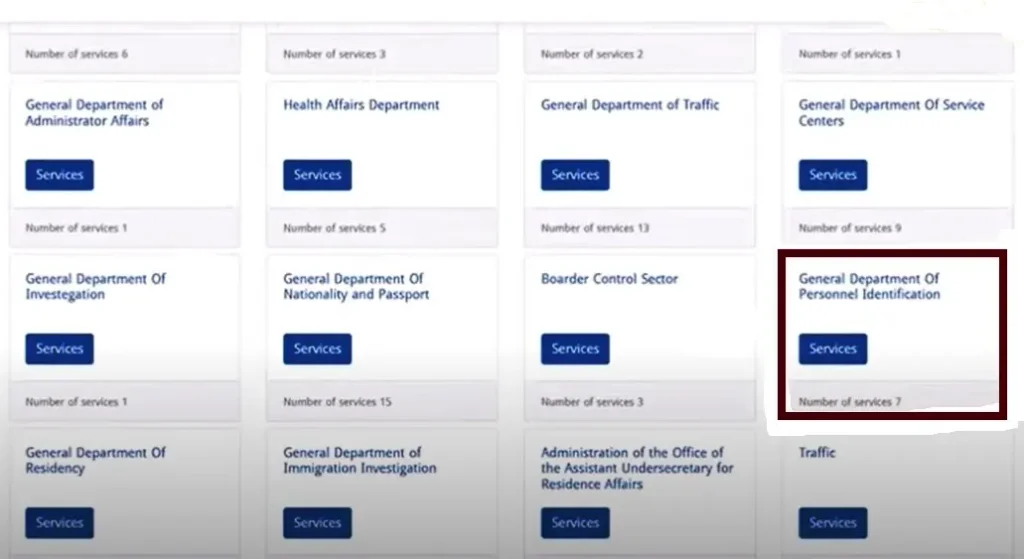
Now, you can see the names of various departments that work under Ministry of Interior. You should select the General Department of Personnel Identification to view its service list.
#Step 6: Select Biometric Enrollment
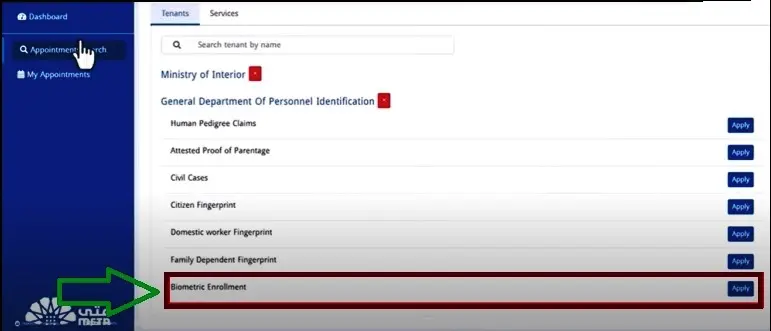
There are total 7 services available under General Department of Personnel Identification. Find out Biometric Enrollment service and click on Apply button.
Then select a branch office that is close to your location.
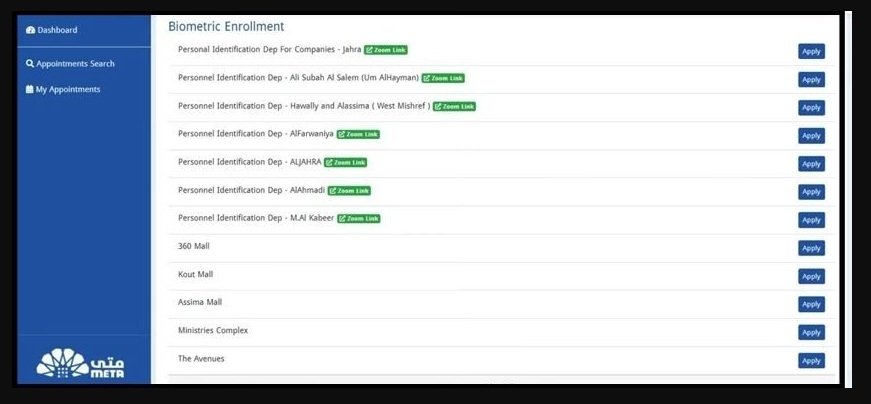
#Step 7: Choose Appointment Date and Time

Select your desired date and time for your biometric appointment.
#Step 8: Confirm Your Appointment
Check your appointment details carefully and click on submit/confirm to complete the appointment booking process.
Meta Kuwait Biometric Appointment via Sahel App
The Sahel App is a unified government application that offers latest news, updates and e-services for citizens and residents of Kuwait. If you want to book a biometric appointment online, you can do it at Meta Portal and also through the Sahel App.
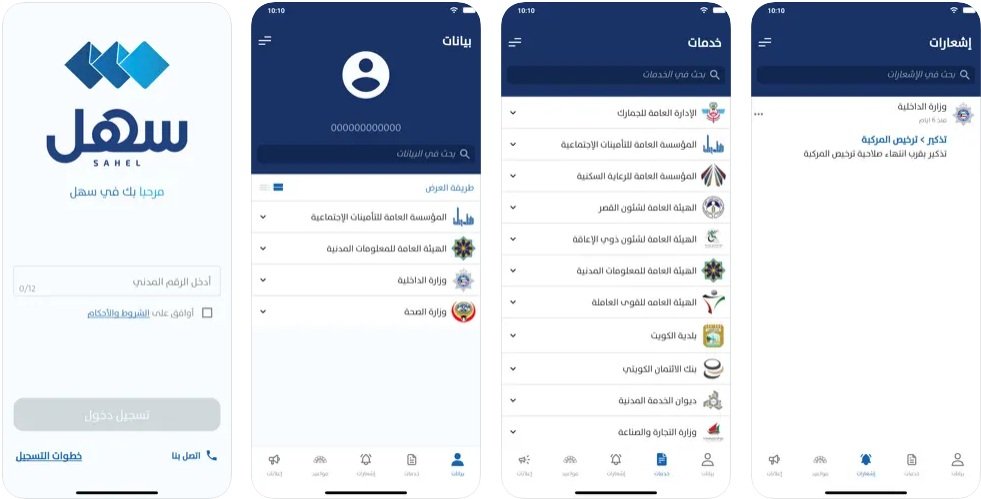
Get Sahel App for Android Mobile or iPhone
- Open Sahel App on your mobile phone.
- Register and Login with your Civil ID and other personal info.
- Find out e-Services section and select META (Meta Portal).
- Select Appointments Search>Ministry of Interior>General Department of Personnel Identification.
- View the list of services and click on Apply for Biometric Enrollment Service.
- Choose your convenient branch, date & time and confirm to finish.
So, this is how you can use Sahel App to book a Meta Kuwait biometric appointment online in Kuwait.
Meta Check-in App Not Available, Why?
The Meta Check-in App is an official app that offers all Meta Portal Services. The Government of Kuwait launched Meta Check-in App for Android Phone and iPhone/iPad devices.
But the Meta Check-in App is not available at Play Store and App Store for last few months. So, the new users cannot download Meta Check-in App and current users cannot update the app.
The Meta Check-in App had some bugs and functional issues. Therefore the developers have revoked the app and it is under development. It is possible that it may take a few more months for coming back to work.
At present, the Meta Portal Services is linked to Sahel App. So, you can access your Meta Account through Sahel App for registration, login, online appointment booking and other purposes.
Meta Kuwait Family Visit Visa Appointment
The foreign citizens working in Kuwait can book family visit visa appointment online via Meta Kuwait Portal.
- Go to Meta Portal and Login.
- Select Appointments Search>Ministry of Interior.
- Choose General Department of Residency.
- Find out Family Visit Visa Service and click on Apply.
- Select your nearest Visa Office for appointment.
- Choose a date and time slot for your appointment.
- Confirm your selected schedule to book the appointment.
Reset Meta Kuwait Login Password
In order to login to Meta Portal, you need to provide your Civil ID Number and Password. In case you have forgot your login password, here I am to guide you on how to reset Meta Kuwait login password in two minutes.
#Step 1: Go to Meta Kuwait Portal @meta.e.gov.kw OR Click Here.
#Step 2: Find and click on Forgot Your Password option.
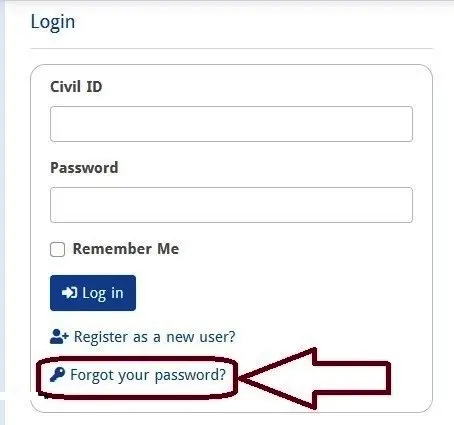
#Step 3: Enter your Civil ID Number and click on Submit.
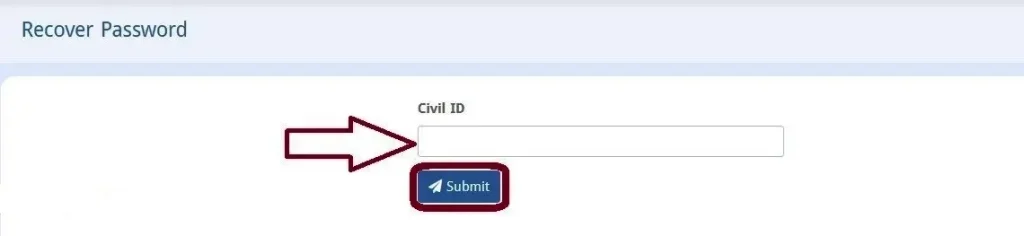
#Step 4: Check your registered email inbox to find a message from Meta Portal.
#Step 5: Open the email message and click on Set Your Password link.
#Step 6: Create New Password for your Meta Account.
In this way, you can reset forgot password on Meta Portal.
Meta Kuwait Account Locked! – How to Unlock
You can login to your Meta Portal Account with your Civil ID Number and Password. If you see an error showing that your Meta Account is Locked during login or after login, you have to unlock it to access Meta Kuwait Services.
Solution 1: Review Security Alerts
You should login to Meta Portal. Then select Security Alerts in Admin Panel. Check the Security Alerts and review them. Then select Unlock Account option and follow on-screen instructions.
In case this solution does not work, try the next one.
Solution 2: Reset Meta Login Password
You can select Forgot Password option at Meta Portal to reset it. Go to Meta Kuwait Portal, select forgot password option and follow on-screen instructions to set a new password. Then login to Meta Portal with your Civil ID and New Password to access the portal.
In case this solution does not work, you should try the ultimate solution given below.
Solution 3: Contact Meta Kuwait Helpline
You should contact Meta Kuwait Helpline from your registered mobile number and send an email from your registered email. You should explain the Meta helpline executive that your account is locked.
The service executive will ask for your Civil ID details for identity verification purposes and then provide a way to unlock your account.
Meta Kuwait Portal Features
The Government of Kuwait has developed Meta Portal with high objectives. Therefore it is necessary to learn how this one portal offers an integrated solution to Kuwaiti citizens, residents and students as well as all government agencies/offices across the country.
Quick Access to Services
The Meta Portal offers quick access to government services for all citizens and residents. No matter where you live or work in Kuwait, you can easily access any government service with help of Meta Portal Kuwait. All you need is a mobile phone with internet to access Meta Kuwait Portal anytime and anywhere.
Connect Government to People
The Meta Portal has created a link to connect all government agencies/offices to the people of Kuwait. Now, the people do not need to visit the offices of different government agencies or their websites, they can access all of them at the Meta Kuwait Portal.
Accurate and Reliable
The Meta Portal offers online appointment booking service in which you can choose your desired date & time for your appointment at a government office. This service makes Meta Kuwait Portal more reliable and accurate as well as time saver for everyone.
Eliminate Unnecessary Rush
The Meta Portal offers online appointment booking so that the people can visit their concerned government office on given time. As a result, the Meta Kuwait Online Appointment Service has eliminated unnecessary rush of people at all government offices.
Meta Kuwait Help and Support
For all queries, doubts and complaints about Meta Kuwait Online Registration, Login, Appointment Booking and all e-services, you can contact Meta Kuwait Support Team through following numbers and email.
- Meta Kuwait Helpline Number: 164
- Meta Kuwait Customer Care Number: 1800 164
- Meta Kuwait Helpline Support Email: meta-support@cait.gov.kw
Conclusion
Meta Portal is an ultimate solution to avoid frequent visits to government offices in Kuwait. It provides online appointment booking service to all government departments for free for all citizens and residents in Kuwait.
I have shared complete information about Meta Kuwait Online Registration, Login, Forgot Password, Online Appointment Booking, Modifying and Cancelling as well as Meta Kuwait Appointment through Sahel App.
In case you still have a query or confusion, contact Meta Kuwait Helpline or ask your question in the comment section given below.
FAQs
How do I book biometric appointment Kuwait?
You can book a biometric appointment online in Kuwait at Meta Portal.
Do I need to register at Meta Kuwait Portal?
Yes, every individual needs to register at Meta Kuwait Portal to access all online services available there.
How can I login to Meta Kuwait Portal?
You can login to Meta Kuwait Portal with your Civil ID Number and Password.
What should I do if Meta Check-in App isn’t working?
The Meta Check-in App is under development and not available for use. You can access all Meta Portal Services in Sahel App.
Can I book an appointment for driving license at Meta Kuwait?
Yes, you can book an appointment for driving license at Meta Kuwait. Go to Meta Kuwait Portal>Login with your Civil ID & Password>Select Appointments Search>Ministry of Interior>Traffic Department>Driving License>Apply>Choose Appointment Date & Time.